I was on the Sun Oracle event here in Istanbul, Turkey on 28.04.2010. The main course was about engaging Oracle with Sun.
The most interesting part for me was the future of Oracle Enterprise Manager. There were a lot of clue for it is going to get bigger, not only for database and application server management but also in virtual machine (both on Solaris and Enterprise linux) and operating system management (Solaris, Redhat Linux and Suse Linux).
Oracle has already began to integrate Sun Opscenter to the Oracle Enterprise Manager. Main idea is single handed management of a datacenter with Oracle Enterprise Manager.
There are some links about this topic.
http://www.oracle.com/oms/enterprisemanager11g/webcast-067871.html
http://www.oracle.com/us/products/enterprise-manager/index.html
Showing posts with label Oracle Enterprise Manager Grid Control. Show all posts
Showing posts with label Oracle Enterprise Manager Grid Control. Show all posts
Sunday, May 2, 2010

Wednesday, November 11, 2009
creating user defined metric for monitoring job durations
In this production system there are some number of database jobs (not Scheduler Jobs) running on different time intervals. Some of these jobs are running on every five minutes while the other running on every hour. There are also some batch jobs scheduled to be run on every night.
There was a custom developed Oracle9i script to monitor every job duration and warn the DBA if there is a broken job or a job with more than three hours of duration. As this database is upgraded to 10g now we are able to use "Notification Rules" and "User Defined Metrics" to monitor the database jobs. This approach will supply us the historical data collection and also the standart notification method with all other EM Console messages. We also will not need to compile this old package on all of the production databases instead the User Defined Metric can be applied to all of the databases with including the metric in the monitoring templates.
"User Defined Metrics" page can be reached from a link at the bottom of the main page of the Enterprise Manager DB Console just under the Related Links section shown below.

When you click to the "User-Defined Metrics" link on the main page of the EM DB Console, User Defined Metrics are listed.
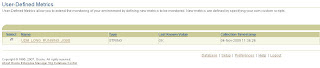
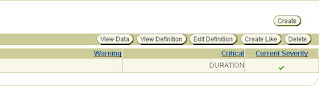
You can manage the your own custom metrics by using the right top buttons. You can simply select on of the User Defined Metric and click on the "View Data" Button.
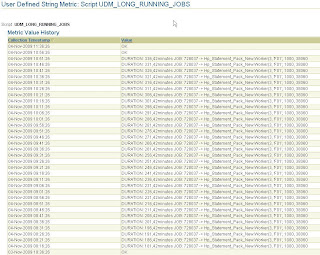
When you click on the "View Data" button the Metric Value History of the specified Metric can be seen.
Again from the main page of the "User-Defined Metrics" you can click on the "Create" Button to create a brand new User Defined Metric. There is a sample new metric creation page values which i used for the metric UDM_LONG_RUNNING_JOBS. This metric calculates the job durations and notified the DBA if there are jobs which have more than 180 Minutes of duration time.
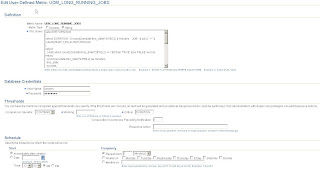
This metric has a string value and collection SQL of the metric is as follows. If the return value contains "DURATION" string then EM Console pretends as it exceeds a Critical Treshold and throws a Critical Alert. Metric collection runs every 5 minutes. At least 1 occurance is sufficient to send a Critical Alert.
select RETURN from
(
select 'DURATION: ' || round((sysdate-this_date)*24*60,2) || 'minutes JOB: ' || job || ' -> ' || substr(WHAT,1,50) as RETURN from
(
select
CASE when round((sysdate-this_date)*24*60,2) >= 5 then 'TRUE' else 'FALSE' end as return,
round((sysdate-this_date)*24*60,2) as minutes,
this_date,
sysdate,
job,
schema_user,
last_date,
next_date,
total_time,
interval,
what
from
dba_jobs
where
broken='N' and
LAST_DATE is not NULL
order by
next_date asc
)
where return='TRUE'
group by round((sysdate-this_date)*24*60,2),job,substr(WHAT,1,50)
UNION
select 'OK' as RETURN from dual
)
where rownum=1
The last thing is, if you want an email notification when a Critical Alert triggered by this User Defined Metric you should add this metric to the notification rules which is in the preferences page of the EM Grid Control.
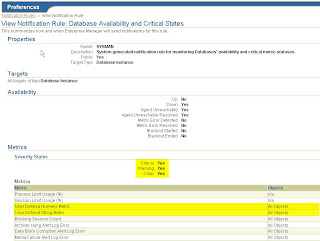
There was a custom developed Oracle9i script to monitor every job duration and warn the DBA if there is a broken job or a job with more than three hours of duration. As this database is upgraded to 10g now we are able to use "Notification Rules" and "User Defined Metrics" to monitor the database jobs. This approach will supply us the historical data collection and also the standart notification method with all other EM Console messages. We also will not need to compile this old package on all of the production databases instead the User Defined Metric can be applied to all of the databases with including the metric in the monitoring templates.
"User Defined Metrics" page can be reached from a link at the bottom of the main page of the Enterprise Manager DB Console just under the Related Links section shown below.

When you click to the "User-Defined Metrics" link on the main page of the EM DB Console, User Defined Metrics are listed.

You can manage the your own custom metrics by using the right top buttons. You can simply select on of the User Defined Metric and click on the "View Data" Button.

When you click on the "View Data" button the Metric Value History of the specified Metric can be seen.

Again from the main page of the "User-Defined Metrics" you can click on the "Create" Button to create a brand new User Defined Metric. There is a sample new metric creation page values which i used for the metric UDM_LONG_RUNNING_JOBS. This metric calculates the job durations and notified the DBA if there are jobs which have more than 180 Minutes of duration time.

This metric has a string value and collection SQL of the metric is as follows. If the return value contains "DURATION" string then EM Console pretends as it exceeds a Critical Treshold and throws a Critical Alert. Metric collection runs every 5 minutes. At least 1 occurance is sufficient to send a Critical Alert.
select RETURN from
(
select 'DURATION: ' || round((sysdate-this_date)*24*60,2) || 'minutes JOB: ' || job || ' -> ' || substr(WHAT,1,50) as RETURN from
(
select
CASE when round((sysdate-this_date)*24*60,2) >= 5 then 'TRUE' else 'FALSE' end as return,
round((sysdate-this_date)*24*60,2) as minutes,
this_date,
sysdate,
job,
schema_user,
last_date,
next_date,
total_time,
interval,
what
from
dba_jobs
where
broken='N' and
LAST_DATE is not NULL
order by
next_date asc
)
where return='TRUE'
group by round((sysdate-this_date)*24*60,2),job,substr(WHAT,1,50)
UNION
select 'OK' as RETURN from dual
)
where rownum=1
The last thing is, if you want an email notification when a Critical Alert triggered by this User Defined Metric you should add this metric to the notification rules which is in the preferences page of the EM Grid Control.

Tuesday, August 5, 2008
Changing sysman password in OMS
I had to change the sysman password today. There are nice articles on the web but in summary, if you want to change the sysman password of the Oracle Enterprise Manager Grid Control Server;
1- stop all opmn processes
2- stop the oms
3- stop the agent
4- change the password of the sysman user
5- update the $AGENT_HOME/sysman/emd/targets.xml file
6- update the $OMS_HOME/sysman/config/emoms.properties file
7- start the agent
8- start the oms
9- start all opmn processes (actually they are being started by oms)
Here are the handy articles i used;
http://oraclespin.wordpress.com/2008/07/18/how-to-change-sysman-password-in-oem-oms/
http://thetendjee.wordpress.com/2006/07/19/changing-sysman-and-dbsnmp-passwords-it-aint-that-easy/
http://dbataj.blogspot.com/2007/07/change-sysman-password.html
1- stop all opmn processes
2- stop the oms
3- stop the agent
4- change the password of the sysman user
5- update the $AGENT_HOME/sysman/emd/targets.xml file
6- update the $OMS_HOME/sysman/config/emoms.properties file
7- start the agent
8- start the oms
9- start all opmn processes (actually they are being started by oms)
Here are the handy articles i used;
http://oraclespin.wordpress.com/2008/07/18/how-to-change-sysman-password-in-oem-oms/
http://thetendjee.wordpress.com/2006/07/19/changing-sysman-and-dbsnmp-passwords-it-aint-that-easy/
http://dbataj.blogspot.com/2007/07/change-sysman-password.html
Wednesday, June 18, 2008
Oracle EM Grid Control - Custom Reports
Creating Custom Grid Report for database availability
Oracle Enterprise Manager GRID Server contains built in reports to support Database Administrators to generate sightly reports. However, in my company, we need some reports that cannot be find in GRID and needs custom development. Here is how i did it.
First Thing is to click to "Reports" tab on the top, right hand side of the GRID Management Console (figure_grid_management_console). This page is where all the predefined and custom reports can be find. Now click on the "Create" Button on top of the page to create a new custom report. "Create Report Definition" page comes to the screen. There are four tabs for the definition of the report.
General
After specifiying title of the report then select category and subcategory from the comboboxes. Category and subcategory defines our newly custom report's group and standing place in the reports list of the GRID reports page. You can also create new categories by clicking the buttons between the comboboxes.
Targets section enables you to limit the available list of target selection while generating the report or you can select a specified target to be used. I used "Specified Target" and left the textbox blank because this report will apply to all database and rac targets and is not allowed to be changed.
You can enable to select time periods by end user or you can preset the time period from the "Time Period" section (figure_create_report_general_tab). This custom report always displays the last known and most updated state of the databases uptimes and downtimes.
Elements
In the Elements tab, you can define the report elements and their positions in the report page (figure_add_elements_1). Report elements are structures that displays selected data from the GRID Servers repository. Click "Add" Button to add elements. I used IPMSG_USER_CHART_FROM_SQL and IPMSG_USER_TABLE_FROM_SQL elements (figure_add_elements_2). Click on the "Set Parameters" icon on the right hand side of the listed items to obtain a statement for the elements (figure_add_elements_2). Here you can enter the sql statement that brings data into the element from Management Servers repository. Following you can find the sql statements for the elements.
IPMSG_USER_TABLE_FROM_SQL
IPMSG_USER_CHART_FROM_SQL
Schedule
You can schedule a report to be emailed to an email by setting schedules (figure_schedule_tab).
Access
Report creator can define user groups or users who will be allowed to access this report. Here i used user groups (figure_access_tab).
Database availability report is now ready for managers
Oracle Enterprise Manager GRID Server contains built in reports to support Database Administrators to generate sightly reports. However, in my company, we need some reports that cannot be find in GRID and needs custom development. Here is how i did it.
First Thing is to click to "Reports" tab on the top, right hand side of the GRID Management Console (figure_grid_management_console). This page is where all the predefined and custom reports can be find. Now click on the "Create" Button on top of the page to create a new custom report. "Create Report Definition" page comes to the screen. There are four tabs for the definition of the report.
General
After specifiying title of the report then select category and subcategory from the comboboxes. Category and subcategory defines our newly custom report's group and standing place in the reports list of the GRID reports page. You can also create new categories by clicking the buttons between the comboboxes.
Targets section enables you to limit the available list of target selection while generating the report or you can select a specified target to be used. I used "Specified Target" and left the textbox blank because this report will apply to all database and rac targets and is not allowed to be changed.
You can enable to select time periods by end user or you can preset the time period from the "Time Period" section (figure_create_report_general_tab). This custom report always displays the last known and most updated state of the databases uptimes and downtimes.
Elements
In the Elements tab, you can define the report elements and their positions in the report page (figure_add_elements_1). Report elements are structures that displays selected data from the GRID Servers repository. Click "Add" Button to add elements. I used IPMSG_USER_CHART_FROM_SQL and IPMSG_USER_TABLE_FROM_SQL elements (figure_add_elements_2). Click on the "Set Parameters" icon on the right hand side of the listed items to obtain a statement for the elements (figure_add_elements_2). Here you can enter the sql statement that brings data into the element from Management Servers repository. Following you can find the sql statements for the elements.
IPMSG_USER_TABLE_FROM_SQL
select
 target_name,
 target_type,
 sum(up_time) up_time,
 sum(down_time) down_time,
 sum(blackout_time) blackout_time,
 trunc(sum(up_time)/(sum(nvl(up_time,1))+sum(nvl(down_time,1)))*100) availability_pct
from
(
select
 target_name,
 target_type,
 sum(trunc((nvl(end_timestamp,sysdate)-start_timestamp)*24)) total_hours,
 case availability_status
   when 'Target Down' then
     0
   when 'Target Up' then
     0
   when 'Blackout' then
     sum(trunc((nvl(end_timestamp,sysdate)-start_timestamp)*24))
 end blackout_time,
 case availability_status
   when 'Target Down' then
     0
   when 'Target Up' then
     sum(trunc((nvl(end_timestamp,sysdate)-start_timestamp)*24))
   when 'Blackout' then
     0
 end up_time,
 case availability_status
   when 'Target Down' then
     sum(trunc((nvl(end_timestamp,sysdate)-start_timestamp)*24))
   when 'Target Up' then
     0
   when 'Blackout' then
     0
 end down_time,
 availability_status
from
 MGMT$AVAILABILITY_HISTORY
where
 target_type in ('oracle_database','rac_database') and
 availability_status in ('Target Down','Target Up','Blackout')
group by
 target_name, target_type, availability_status
order by target_name, availability_status
)
group by target_name, target_type
order by target_name

--sample output:

TARGET_NAME    TARGET_TYPE     UP_TIME   DOWN_TIME    BLACKOUT_TIME  AVAILABILITY_PCT
-----------    -----------     -------   ---------    -------------  ----------------
ACTV           rac_database    4823      0            1                100
ACTV_ACTV1     oracle_database 4823      0            1                100
ACTV_ACTV2     oracle_database 3964      0            1                100
ARCH.AVEA.COM  oracle_database 3334      0            0                100
ARCHCM         oracle_database 2210      1126         0                66
ARCHDB         rac_database    3858      0            653              100
ARCHDB_ARCHDB1 oracle_database 3514      31           652              99
ARCHDB_ARCHDB2 oracle_database 3725      0            652              100
ASPDB          oracle_database 1750      2            0                99
...
IPMSG_USER_CHART_FROM_SQL
select
 availability_status,
 sum(trunc((end_timestamp-start_timestamp)*24)) total_hours
from
 MGMT$AVAILABILITY_HISTORY
where
 target_type in ('oracle_database','rac_database') and
 availability_status in ('Target Down','Target Up','Blackout')
group by
 availability_status

--sample output:

AVAILABILITY_STATUS   TOTAL_HOURS
-------------------   -----------
Target Up             130008
Target Down           2086
Blackout              2405
Schedule
You can schedule a report to be emailed to an email by setting schedules (figure_schedule_tab).
Access
Report creator can define user groups or users who will be allowed to access this report. Here i used user groups (figure_access_tab).
Database availability report is now ready for managers
Wednesday, April 16, 2008
Resetting Timezone of a Grid Agent 10.2
Problem: Operating system Timezone is changed after an Oracle Grid Agent installation. This problem occured on an IBM AIX 5.3 host. Maybe one of our UNIX administrators decided to change the Timezone setting $TZ in our UNIX environment. Our Oracle Grid Agent couldnt be opened after that.
#> $AGENT_HOME/bin/emctl start agent
Oracle Enterprise Manager 10g Release 3 Grid Control 10.2.0.3.0.
Copyright (c) 1996, 2007 Oracle Corporation. All rights reserved.
Starting agent ....... failed.
The agentTZRegion value in /oracle/product/10.2.0/agent/agent10g/dwhnserp0/sysman/config/emd.properties is not in agreement with what agent thinks it should be.Please verify your environment to make sure that TZ setting has not changed since the last start of the agent.
If you modified the timezone setting in the environment, please stop the agent and exectute 'emctl resetTZ agent' and also execute the script mgmt_target.set_agent_tzrgn(, ) to get the value propagated to repository.
Consult the log files in: /oracle/product/10.2.0/agent/agent10g/dwhnserp0/sysman/log
#> echo $TZ
MEST-2MEDT,M3.5.0,M10.5.0
#> export TZ=+2:00
#> $AGENT_HOME/bin/emctl resetTZ agent
emctl resetTZ agent command automatically changes the agentTZRegion entry of the emd.properties file. But here I also changed the last row of the file $AGENT_HOME/sysman/config/emd.properties to '+2:00' manually.
#agentTZRegion=Etc/GMT-3
agentTZRegion=+2:00
Now on the Grid Server run the following command. First parameter is the name of the target, and the second one is timezone value. Name of the target is usually nodename:portnumber.
You can also check the registered timezone property of the target with the following query. Again from the Grid Server:
#> $AGENT_HOME/bin/emctl start agent
Oracle Enterprise Manager 10g Release 3 Grid Control 10.2.0.3.0.
Copyright (c) 1996, 2007 Oracle Corporation. All rights reserved.
Starting agent ............... started.
#> $AGENT_HOME/bin/emctl status agent
You can find the supported Timezone values in a file under sysman directory
cat $AGENT_HOME/sysman/admin/supportedtzs.lst | more
# Timezone regions with +02:00 standard offset from GMT
Africa/Cairo
Africa/Johannesburg
Africa/Khartoum
Africa/Tripoli
Africa/Windhoek
Asia/Beirut
Asia/Damascus
Asia/Gaza
Asia/Istanbul
Asia/Jerusalem
Asia/Nicosia
Asia/Tel_Aviv
EET
Egypt
Etc/GMT-2
Europe/Athens
Europe/Bucharest
Europe/Helsinki
Europe/Istanbul
Europe/Kaliningrad
Europe/Kiev
Europe/Minsk
Europe/Riga
Europe/Simferopol
Europe/Sofia
Europe/Tallinn
Europe/Vilnius
Israel
Libya
Turkey
# Timezone regions with +03:00 standard offset from GMT
Africa/Djibouti
Africa/Mogadishu
Africa/Nairobi
Asia/Aden
Asia/Amman
Asia/Baghdad
Asia/Bahrain
Asia/Kuwait
#> $AGENT_HOME/bin/emctl start agent
Oracle Enterprise Manager 10g Release 3 Grid Control 10.2.0.3.0.
Copyright (c) 1996, 2007 Oracle Corporation. All rights reserved.
Starting agent ....... failed.
The agentTZRegion value in /oracle/product/10.2.0/agent/agent10g/dwhnserp0/sysman/config/emd.properties is not in agreement with what agent thinks it should be.Please verify your environment to make sure that TZ setting has not changed since the last start of the agent.
If you modified the timezone setting in the environment, please stop the agent and exectute 'emctl resetTZ agent' and also execute the script mgmt_target.set_agent_tzrgn(
Consult the log files in: /oracle/product/10.2.0/agent/agent10g/dwhnserp0/sysman/log
#> echo $TZ
MEST-2MEDT,M3.5.0,M10.5.0
#> export TZ=+2:00
#> $AGENT_HOME/bin/emctl resetTZ agent
emctl resetTZ agent command automatically changes the agentTZRegion entry of the emd.properties file. But here I also changed the last row of the file $AGENT_HOME/sysman/config/emd.properties to '+2:00' manually.
#agentTZRegion=Etc/GMT-3
agentTZRegion=+2:00
Now on the Grid Server run the following command. First parameter is the name of the target, and the second one is timezone value. Name of the target is usually nodename:portnumber.
#> sqlplus "/ as sysdba"
sqlplus> exec mgmt_target.set_agent_tzrgn('dwhnserp0:3872', '-2:00');
sqlplus> exit;
#>
You can also check the registered timezone property of the target with the following query. Again from the Grid Server:
#> sqlplus "/ as sysdba"
sqlplus> select timezone_region from mgmt_targets
         where target_name = 'dwhserp00:3872';
sqlplus> exit;
#>
#> $AGENT_HOME/bin/emctl start agent
Oracle Enterprise Manager 10g Release 3 Grid Control 10.2.0.3.0.
Copyright (c) 1996, 2007 Oracle Corporation. All rights reserved.
Starting agent ............... started.
#> $AGENT_HOME/bin/emctl status agent
Oracle Enterprise Manager 10g Release 3 Grid Control 10.2.0.3.0.
Copyright (c) 1996, 2007 Oracle Corporation.  All rights reserved.
---------------------------------------------------------------
Agent Version     : 10.2.0.3.0
OMS Version       : 10.2.0.3.0
Protocol Version  : 10.2.0.2.0
Agent Home        : /oracle/product/10.2.0/agent/agent10g/dwhnserp0
Agent binaries    : /oracle/product/10.2.0/agent/agent10g
Agent Process ID  : 525810
Parent Process ID : 143586
Agent URL         : https://dwhnserp0:3872/emd/main
Repository URL    : https://oragrid:1159/em/upload
Started at        : 2008-04-11 16:28:27
Started by user   : oracle
Last Reload       : 2008-04-11 16:28:27
Last successful upload                       : (none)
Last attempted upload                        : (none)
Total Megabytes of XML files uploaded so far :     0.00
Number of XML files pending upload           :        6
Size of XML files pending upload(MB)         :     0.34
Available disk space on upload filesystem    :    41.66%
Last successful heartbeat to OMS             : 2008-04-11 16:28:46
---------------------------------------------------------------
Agent is Running and Ready
You can find the supported Timezone values in a file under sysman directory
cat $AGENT_HOME/sysman/admin/supportedtzs.lst | more
# Timezone regions with +02:00 standard offset from GMT
Africa/Cairo
Africa/Johannesburg
Africa/Khartoum
Africa/Tripoli
Africa/Windhoek
Asia/Beirut
Asia/Damascus
Asia/Gaza
Asia/Istanbul
Asia/Jerusalem
Asia/Nicosia
Asia/Tel_Aviv
EET
Egypt
Etc/GMT-2
Europe/Athens
Europe/Bucharest
Europe/Helsinki
Europe/Istanbul
Europe/Kaliningrad
Europe/Kiev
Europe/Minsk
Europe/Riga
Europe/Simferopol
Europe/Sofia
Europe/Tallinn
Europe/Vilnius
Israel
Libya
Turkey
# Timezone regions with +03:00 standard offset from GMT
Africa/Djibouti
Africa/Mogadishu
Africa/Nairobi
Asia/Aden
Asia/Amman
Asia/Baghdad
Asia/Bahrain
Asia/Kuwait
Tuesday, January 29, 2008
When the Grid Agent couldnt find any target on host...
Subject: Manually adding targets to EM Grid Agent installed on a host.
Problem: As the installation procedure finishes successfully on a target host, EM agent examines "/etc/oratab" file (on UNIX operating system) to find the installed oracle products on the host. What if the specified file doesnt exist or somehow agent couldnt read the file?
Solution: Before the installation, you should check "/etc/oratab" file if it exists. If not, check the "/var/oracle" directory for the oratab file and make symbolic link named oratab under "/etc" directory.
If the agent cannot find any target on the host in all circumstances you can try adding the targets manually after installation. You will find configuration file, template entry for a "database" and a "listener".
EM Agent stores target information in targets.xml file located at "$AGENT_HOME/sysman/emd" directory. A sample file without any targets can be find as follows.
You can add a listener as a target to targets.xml file by using the following template. (values between the three stars - *** *** - are system specific. You should use your own systems parameters instead of *** *** values)
The following template is for manually entering database target to a EM Agent. (values between the three stars - *** *** - are system specific. You should use your own systems parameters instead of *** ... *** values)
After you are done with your "targets.xml" file you should run emctl reload agent to read the configuration files from scratch. You can check the defined targets by running emctl config agent listtargets
Problem: As the installation procedure finishes successfully on a target host, EM agent examines "/etc/oratab" file (on UNIX operating system) to find the installed oracle products on the host. What if the specified file doesnt exist or somehow agent couldnt read the file?
Solution: Before the installation, you should check "/etc/oratab" file if it exists. If not, check the "/var/oracle" directory for the oratab file and make symbolic link named oratab under "/etc" directory.
If the agent cannot find any target on the host in all circumstances you can try adding the targets manually after installation. You will find configuration file, template entry for a "database" and a "listener".
EM Agent stores target information in targets.xml file located at "$AGENT_HOME/sysman/emd" directory. A sample file without any targets can be find as follows.
<Targets AGENT_TOKEN="e7244b84afad62c94aad53fe407af2514e3b7f04">
        <Target TYPE="oracle_emd" NAME="oragrid:3872"/>
        <Target TYPE="host" NAME="oragrid"/>
</Targets>
You can add a listener as a target to targets.xml file by using the following template. (values between the three stars - *** *** - are system specific. You should use your own systems parameters instead of *** *** values)
<Target TYPE="oracle_listener" NAME="***LISTENER_NAME***">
        <Property NAME="ListenerOraDir" VALUE="$ORACLE_HOME/network/admin"/>
        <Property NAME="LsnrName" VALUE="***LISTENER_NAME***"/>
        <Property NAME="Machine" VALUE="***HOSTNAME***"/>
        <Property NAME="OracleHome" VALUE="***$ORACLE_HOME***"/>
        <Property NAME="Port" VALUE="***LISTENER_PORT***"/>
</Target>
The following template is for manually entering database target to a EM Agent. (values between the three stars - *** *** - are system specific. You should use your own systems parameters instead of *** ... *** values)
<Target TYPE="oracle_database" NAME="***DB_NAME***"/>
        <Property NAME="OracleHome" VALUE="***$ORACLE_HOME***"/>
        <Property NAME="UserName" VALUE="dbsnmp"/>
        <Property NAME="MachineName" VALUE="***HOSTNAME***"/>
        <Property NAME="Port" VALUE="1521"/>
        <Property NAME="SID" VALUE="***$ORACLE_SID***"/>
        <Property NAME="ServiceName" VALUE="***$SERVICE_NAME***"/>
        <Property NAME="password" VALUE="***PASSWORD***" ENCRYPTED="FALSE"/>
        <Property NAME="Role" VALUE="NORMAL"/>
</Target>
After you are done with your "targets.xml" file you should run emctl reload agent to read the configuration files from scratch. You can check the defined targets by running emctl config agent listtargets
Sunday, January 13, 2008
Installing Grid Agent to a target host
Subject: Installing Oracle Enterprise Manager Grid Control 10.2.0.3 agent on a target host.
I will examine the installation process in three main part. Preinstallation part, is a group of work should be done before executing runInstaller installation script. There is some work to to on OMS Server and on the TARGET side. The second part includes some screenshots and it is actually the time after you execute runInstaller script. Tha last part is the postinstallation part stands for some settings.
PREINSTALLATION
OMS
First you should enter a host record for the target host. IP and HOSTNAME record should be entered to /etc/hosts operating system file. One thing to remember, IP number should be the one listener executes on. Ping should answer after the configuration.
[oracle@oragrid ~]$ ping fmsserp1
ping: unknown host fmsserp1
[oracle@oragrid ~]$ su -
Password:
[root@oragrid ~]# cat /etc/hosts | grep fmsserp1
[root@oragrid ~]# vi /etc/hosts
[root@oragrid ~]# ping fmsserp1
PING fmsserp1 (10.4.9.83) 56(84) bytes of data.
64 bytes from fmsserp1 (10.4.9.83): icmp_seq=0 ttl=254 time=0.219 ms
64 bytes from fmsserp1 (10.4.9.83): icmp_seq=1 ttl=254 time=0.197 ms
64 bytes from fmsserp1 (10.4.9.83): icmp_seq=2 ttl=254 time=0.198 ms
64 bytes from fmsserp1 (10.4.9.83): icmp_seq=3 ttl=254 time=0.193 ms
64 bytes from fmsserp1 (10.4.9.83): icmp_seq=4 ttl=254 time=0.197 ms
--- fmsserp1 ping statistics ---
5 packets transmitted, 5 received, 0% packet loss, time 4000ms
rtt min/avg/max/mdev = 0.193/0.200/0.219/0.020 ms, pipe 2
[root@oragrid ~]# cat /etc/hosts | grep fmsserp1
10.4.9.83 fmsserp1
[root@oragrid ~]#
AGENT
Agent should also know the IP HOSTNAME pair of the OMS Server. You can also find the listening IP address to enter the OMS Server host file.
$AGENT_HOME should be exported. It is not a must but nice to have especially while searching the setup directory of the agent.
Be sure /etc/oratab file exists. On some operating systems the file exists on /var/oracle directory, if so you should create a soft link /etc/oratab for /var/oracle/oratab because agent will find the targets installed on the host by looking this file.
You can now go the installer directory to run the runInstaller. Be sure you have enough space in /tmp directory. If not you can delete older oracle installer logs.
$ hostname
fmsserp1
$ netstat -ni
Name Mtu Network Address Ipkts Ierrs Opkts Oerrs Coll
lan0:1 1500 10.4.9.0 10.4.9.83 31833330 0 2849543 0 0
lan2* 1500 none none 0 0 0 0 0
lan1 1500 192.168.0.0 192.168.0.2 6331944 0 11558318 0 0
lan0 1500 10.4.9.0 10.4.9.82 2445705484 0 1271175018 0 0
lo0 4136 127.0.0.0 127.0.0.1 206103084 0 206104962 0 0
$ ping oragrid
sh: ping: not found.
$ su -
Password:
fmsserp1:/#ping oragrid
ping: unknown host oragrid
fmsserp1:/#
fmsserp1:/#cat /etc/hosts | grep oragrid
fmsserp1:/#
fmsserp1:/#cat /etc/hosts | grep oragrid
10.4.46.70 oragrid
fmsserp1:/#tail -2 /etc/hosts
#EM Agent
10.4.46.70 oragrid
fmsserp1:/#
fmsserp1:/#id
uid=0(root) gid=3(sys) groups=0(root),1(other),2(bin),4(adm),5(daemon),6(mail),7(lp),20(users)
fmsserp1:/#exit
logout root
$ id
uid=106(oradet) gid=104(dba)
$ cd $ORACLE_HOME/network/admin
$ cat listener.ora
LISTENER_ARCHIVE =
(ADDRESS_LIST =
(ADDRESS = (PROTOCOL = TCP)(HOST = 10.4.9.83)(PORT = 1521))
(ADDRESS = (PROTOCOL = TCP)(HOST = 10.4.9.83)(PORT = 1526))
)
SID_LIST_LISTENER_ARCHIVE =
(SID_LIST =
(SID_DESC =
(GLOBAL_DBNAME = AVEA93_C )
(ORACLE_HOME = /fmsarch_ora/product/9.2.0 )
(SID_NAME = AVEA93_C)
)
)
$
$ lsnrctl status LISTENER_ARCHIVE
LSNRCTL for HPUX: Version 9.2.0.6.0 - Production on 10-JAN-2008 11:42:22
Copyright (c) 1991, 2002, Oracle Corporation. All rights reserved.
Connecting to (ADDRESS=(PROTOCOL=TCP)(HOST=10.4.9.83)(PORT=1521))
STATUS of the LISTENER
------------------------
Alias LISTENER_ARCHIVE
Version TNSLSNR for HPUX: Version 9.2.0.6.0 - Production
Start Date 20-NOV-2007 06:19:08
Uptime 51 days 5 hr. 23 min. 14 sec
Trace Level off
Security OFF
SNMP OFF
Listener Parameter File /fmsarch_ora/product/9.2.0/network/admin/listener.ora
Listener Log File /fmsarch_ora/product/9.2.0/network/log/listener_archive.log
Listening Endpoints Summary...
(DESCRIPTION=(ADDRESS=(PROTOCOL=tcp)(HOST=10.4.9.83)(PORT=1521)))
(DESCRIPTION=(ADDRESS=(PROTOCOL=tcp)(HOST=10.4.9.83)(PORT=1526)))
Services Summary...
Service "AVEA93_C" has 1 instance(s).
Instance "AVEA93_C", status UNKNOWN, has 1 handler(s) for this service...
The command completed successfully
$ echo $AGENT_HOME
$ cd
$ export AGENT_HOME=/fmsarch_ora/product/agent10g/agent10g
$ echo $AGENT_HOME
/fmsarch_ora/product/agent10g/agent10g
$ cat /etc/oratab
#
# This file is used by ORACLE utilities. It is created by root.sh
# and updated by the Database Configuration Assistant when creating
# a database.
# A colon, ':', is used as the field terminator. A new line terminates
# the entry. Lines beginning with a pound sign, '#', are comments.
#
# Entries are of the form:
# $ORACLE_SID:$ORACLE_HOME::
#
# The first and second fields are the system identifier and home
# directory of the database respectively. The third filed indicates
# to the dbstart utility that the database should , "Y", or should not,
# "N", be brought up at system boot time.
#
# Multiple entries with the same $ORACLE_SID are not allowed.
#
#
*:/fmsarch_ora/product/9.2.0:N
$
$ cd oracle_setup
$ ls
HPI_Grid_Control_agent_download_10_2_0_3_0.zip hpi
agent_download.rsp.bak instructions.txt
agentdeployroot.sh
$ cd hpi
$ ls
addons agentDownload.hpi agentdeploy prereqs
agent agent_scripts.jar oui response
$ cd agent
$ ls
install runInstaller stage
$ DISPLAY=10.1.22.210:0.0
$ export DISPLAY
$ ./runInstaller
Starting Oracle Universal Installer...
Checking installer requirements...
Checking operating system version: must be B.11.23. Actual B.11.23
Passed
Checking swap space: must be greater than 250 MB. Actual 4096 MB Passed
Checking temp space: 257 MB available, 500 MB required. Failed <<<<
Some requirement checks failed. You must fulfill these requirements before
continuing with the installation,at which time they will be rechecked.
Continue? (y/n) [n] n
User Selected: No
$ cd /tmp
$ ls -l | grep Ora
drwxrwxr-x 4 fmsarch fms 96 Jun 7 2006 OraInstall2006-06-07_01-03-59PM
drwxrwxr-x 4 oraarch fms 8192 Jun 7 2006 OraInstall2006-06-07_01-08-20PM
drwxrwxr-x 4 oraarch fms 8192 Jun 7 2006 OraInstall2006-06-07_01-27-41PM
drwxr-xr-x 4 oraarch fms 8192 Jun 7 2006 OraInstall2006-06-07_01-34-00PM
drwxr-xr-x 4 oraarch fms 8192 Jun 7 2006 OraInstall2006-06-07_01-50-37PM
drwxrwxr-x 4 fmsarch fms 8192 Jun 7 2006 OraInstall2006-06-07_11-42-22AM
drwxrwxr-x 4 fmsarch fms 8192 Jun 7 2006 OraInstall2006-06-07_11-44-54AM
drwxrwx--- 2 oraarch dba 96 Jan 10 09:49 OraInstall2008-01-10_09-49-20AM
$ ls -l | grep Ora | awk '{print $9}'
OraInstall2006-06-07_01-03-59PM
OraInstall2006-06-07_01-08-20PM
OraInstall2006-06-07_01-27-41PM
OraInstall2006-06-07_01-34-00PM
OraInstall2006-06-07_01-50-37PM
OraInstall2006-06-07_11-42-22AM
OraInstall2006-06-07_11-44-54AM
OraInstall2008-01-10_09-49-20AM
$ ls -l | grep Ora | awk '{print $9}' | xargs rm –r
RUNINSTALLER
This is the easiest part of the installation once you pass the "system check" screen. You should only know the IP address of the OMS Server and registration password, the one you obtain while installing the Grid Server.
After the root.sh script runs successfully there is only a few things to do.
$ ./runInstaller
Starting Oracle Universal Installer...
Checking installer requirements...
Checking operating system version: must be B.11.23. Actual B.11.23
Passed
Checking swap space: must be greater than 250 MB. Actual 4096 MB Passed
Checking Temp space: must be greater than 500 MB. Actual 640 MB Passed
All installer requirements met.
Preparing to launch Oracle Universal Installer from /tmp/OraInstall2008-01-10_09-52-44AM. Please wait ...


fmsserp1:/fmsarch_ora/product/agent10g/agent10g #
$ id
uid=109(oraarch) gid=104(dba) groups=105(fms)
$ su - root
Password:
fmsserp1:/#
fmsserp1:/#cd /fmsarch_ora/product/agent10g/agent10g
fmsserp1:/fmsarch_ora/product/agent10g/agent10g#./root.sh
Running Oracle10 root.sh script...
The following environment variables are set as:
ORACLE_OWNER= oraarch
ORACLE_HOME= /fmsarch_ora/product/agent10g/agent10g
Enter the full pathname of the local bin directory: [/usr/local/bin]:
The file "dbhome" already exists in /usr/local/bin. Overwrite it? (y/n) [n]:
The file "oraenv" already exists in /usr/local/bin. Overwrite it? (y/n) [n]:
The file "coraenv" already exists in /usr/local/bin. Overwrite it? (y/n) [n]:
Entries will be added to the /etc/oratab file as needed by
Database Configuration Assistant when a database is created
Finished running generic part of root.sh script.
Now product-specific root actions will be performed.
Finished product-specific root actions.


POSTINSTALLATION
Agent software uses dbsnmp user to obtain information from the database instances. So you should unlock the user if it is locked. Here I also change the password for security.
After unlocking and chaning the password of the dbsnmp user you should also inform the agent software about the changes. Rest of the subject is as follows :)
fmsserp1:/fmsarch_ora/product/agent10g/agent10g#exit
logout root
$ id
uid=109(oraarch) gid=104(dba) groups=105(fms)
$ sqlplus "/ as sysdba"
SQL*Plus: Release 9.2.0.6.0 - Production on Thu Jan 10 10:17:18 2008
Copyright (c) 1982, 2002, Oracle Corporation. All rights reserved.
Connected to:
Oracle9i Enterprise Edition Release 9.2.0.6.0 - 64bit Production
With the Partitioning, OLAP and Oracle Data Mining options
JServer Release 9.2.0.6.0 – Production
SQL> select name from v$database;
NAME
---------
AVEA93_C
SQL>
SQL> alter user dbsnmp account unlock;
User altered.
SQL> alter user dbsnmp identified by ****;
User altered.
SQL> exit
Disconnected from Oracle9i Enterprise Edition Release 9.2.0.6.0 - 64bit Production
With the Partitioning, OLAP and Oracle Data Mining options
JServer Release 9.2.0.6.0 - Production
$ ./emctl config agent listtargets
Oracle Enterprise Manager 10g Release 3 Grid Control 10.2.0.3.0.
Copyright (c) 1996, 2007 Oracle Corporation. All rights reserved.
[fmsserp1:3872, oracle_emd]
[fmsserp1, host]
[LISTENER_ARCHIVE, oracle_listener]
[AVEA93_C, oracle_database]
$ ./emctl config agent credentials AVEA93_C:oracle_database
Oracle Enterprise Manager 10g Release 3 Grid Control 10.2.0.3.0.
Copyright (c) 1996, 2007 Oracle Corporation. All rights reserved.
Name = AVEA93_C, Type = oracle_database
Want to change for "UserName" (y/n):n
Want to change for "password" (y/n):y
Enter the new value for "password" :*******************
Re-enter the new value for "password" :*******************
EMD reload completed successfully
$ ./emctl reload agent
Oracle Enterprise Manager 10g Release 3 Grid Control 10.2.0.3.0.
Copyright (c) 1996, 2007 Oracle Corporation. All rights reserved.
---------------------------------------------------------------
EMD reload completed successfully
$ ./emctl upload agent
Oracle Enterprise Manager 10g Release 3 Grid Control 10.2.0.3.0.
Copyright (c) 1996, 2007 Oracle Corporation. All rights reserved.
---------------------------------------------------------------
EMD upload completed successfully
When the works done successfully everything should be fine. Now is the time to wait a little while for Grid Server (OMS) to discovery newly installed target.
I will examine the installation process in three main part. Preinstallation part, is a group of work should be done before executing runInstaller installation script. There is some work to to on OMS Server and on the TARGET side. The second part includes some screenshots and it is actually the time after you execute runInstaller script. Tha last part is the postinstallation part stands for some settings.
PREINSTALLATION
OMS
First you should enter a host record for the target host. IP and HOSTNAME record should be entered to /etc/hosts operating system file. One thing to remember, IP number should be the one listener executes on. Ping should answer after the configuration.
[oracle@oragrid ~]$ ping fmsserp1
ping: unknown host fmsserp1
[oracle@oragrid ~]$ su -
Password:
[root@oragrid ~]# cat /etc/hosts | grep fmsserp1
[root@oragrid ~]# vi /etc/hosts
[root@oragrid ~]# ping fmsserp1
PING fmsserp1 (10.4.9.83) 56(84) bytes of data.
64 bytes from fmsserp1 (10.4.9.83): icmp_seq=0 ttl=254 time=0.219 ms
64 bytes from fmsserp1 (10.4.9.83): icmp_seq=1 ttl=254 time=0.197 ms
64 bytes from fmsserp1 (10.4.9.83): icmp_seq=2 ttl=254 time=0.198 ms
64 bytes from fmsserp1 (10.4.9.83): icmp_seq=3 ttl=254 time=0.193 ms
64 bytes from fmsserp1 (10.4.9.83): icmp_seq=4 ttl=254 time=0.197 ms
--- fmsserp1 ping statistics ---
5 packets transmitted, 5 received, 0% packet loss, time 4000ms
rtt min/avg/max/mdev = 0.193/0.200/0.219/0.020 ms, pipe 2
[root@oragrid ~]# cat /etc/hosts | grep fmsserp1
10.4.9.83 fmsserp1
[root@oragrid ~]#
AGENT
Agent should also know the IP HOSTNAME pair of the OMS Server. You can also find the listening IP address to enter the OMS Server host file.
$AGENT_HOME should be exported. It is not a must but nice to have especially while searching the setup directory of the agent.
Be sure /etc/oratab file exists. On some operating systems the file exists on /var/oracle directory, if so you should create a soft link /etc/oratab for /var/oracle/oratab because agent will find the targets installed on the host by looking this file.
You can now go the installer directory to run the runInstaller. Be sure you have enough space in /tmp directory. If not you can delete older oracle installer logs.
$ hostname
fmsserp1
$ netstat -ni
Name Mtu Network Address Ipkts Ierrs Opkts Oerrs Coll
lan0:1 1500 10.4.9.0 10.4.9.83 31833330 0 2849543 0 0
lan2* 1500 none none 0 0 0 0 0
lan1 1500 192.168.0.0 192.168.0.2 6331944 0 11558318 0 0
lan0 1500 10.4.9.0 10.4.9.82 2445705484 0 1271175018 0 0
lo0 4136 127.0.0.0 127.0.0.1 206103084 0 206104962 0 0
$ ping oragrid
sh: ping: not found.
$ su -
Password:
fmsserp1:/#ping oragrid
ping: unknown host oragrid
fmsserp1:/#
fmsserp1:/#cat /etc/hosts | grep oragrid
fmsserp1:/#
fmsserp1:/#cat /etc/hosts | grep oragrid
10.4.46.70 oragrid
fmsserp1:/#tail -2 /etc/hosts
#EM Agent
10.4.46.70 oragrid
fmsserp1:/#
fmsserp1:/#id
uid=0(root) gid=3(sys) groups=0(root),1(other),2(bin),4(adm),5(daemon),6(mail),7(lp),20(users)
fmsserp1:/#exit
logout root
$ id
uid=106(oradet) gid=104(dba)
$ cd $ORACLE_HOME/network/admin
$ cat listener.ora
LISTENER_ARCHIVE =
(ADDRESS_LIST =
(ADDRESS = (PROTOCOL = TCP)(HOST = 10.4.9.83)(PORT = 1521))
(ADDRESS = (PROTOCOL = TCP)(HOST = 10.4.9.83)(PORT = 1526))
)
SID_LIST_LISTENER_ARCHIVE =
(SID_LIST =
(SID_DESC =
(GLOBAL_DBNAME = AVEA93_C )
(ORACLE_HOME = /fmsarch_ora/product/9.2.0 )
(SID_NAME = AVEA93_C)
)
)
$
$ lsnrctl status LISTENER_ARCHIVE
LSNRCTL for HPUX: Version 9.2.0.6.0 - Production on 10-JAN-2008 11:42:22
Copyright (c) 1991, 2002, Oracle Corporation. All rights reserved.
Connecting to (ADDRESS=(PROTOCOL=TCP)(HOST=10.4.9.83)(PORT=1521))
STATUS of the LISTENER
------------------------
Alias LISTENER_ARCHIVE
Version TNSLSNR for HPUX: Version 9.2.0.6.0 - Production
Start Date 20-NOV-2007 06:19:08
Uptime 51 days 5 hr. 23 min. 14 sec
Trace Level off
Security OFF
SNMP OFF
Listener Parameter File /fmsarch_ora/product/9.2.0/network/admin/listener.ora
Listener Log File /fmsarch_ora/product/9.2.0/network/log/listener_archive.log
Listening Endpoints Summary...
(DESCRIPTION=(ADDRESS=(PROTOCOL=tcp)(HOST=10.4.9.83)(PORT=1521)))
(DESCRIPTION=(ADDRESS=(PROTOCOL=tcp)(HOST=10.4.9.83)(PORT=1526)))
Services Summary...
Service "AVEA93_C" has 1 instance(s).
Instance "AVEA93_C", status UNKNOWN, has 1 handler(s) for this service...
The command completed successfully
$ echo $AGENT_HOME
$ cd
$ export AGENT_HOME=/fmsarch_ora/product/agent10g/agent10g
$ echo $AGENT_HOME
/fmsarch_ora/product/agent10g/agent10g
$ cat /etc/oratab
#
# This file is used by ORACLE utilities. It is created by root.sh
# and updated by the Database Configuration Assistant when creating
# a database.
# A colon, ':', is used as the field terminator. A new line terminates
# the entry. Lines beginning with a pound sign, '#', are comments.
#
# Entries are of the form:
# $ORACLE_SID:$ORACLE_HOME:
#
# The first and second fields are the system identifier and home
# directory of the database respectively. The third filed indicates
# to the dbstart utility that the database should , "Y", or should not,
# "N", be brought up at system boot time.
#
# Multiple entries with the same $ORACLE_SID are not allowed.
#
#
*:/fmsarch_ora/product/9.2.0:N
$
$ cd oracle_setup
$ ls
HPI_Grid_Control_agent_download_10_2_0_3_0.zip hpi
agent_download.rsp.bak instructions.txt
agentdeployroot.sh
$ cd hpi
$ ls
addons agentDownload.hpi agentdeploy prereqs
agent agent_scripts.jar oui response
$ cd agent
$ ls
install runInstaller stage
$ DISPLAY=10.1.22.210:0.0
$ export DISPLAY
$ ./runInstaller
Starting Oracle Universal Installer...
Checking installer requirements...
Checking operating system version: must be B.11.23. Actual B.11.23
Passed
Checking swap space: must be greater than 250 MB. Actual 4096 MB Passed
Checking temp space: 257 MB available, 500 MB required. Failed <<<<
Some requirement checks failed. You must fulfill these requirements before
continuing with the installation,at which time they will be rechecked.
Continue? (y/n) [n] n
User Selected: No
$ cd /tmp
$ ls -l | grep Ora
drwxrwxr-x 4 fmsarch fms 96 Jun 7 2006 OraInstall2006-06-07_01-03-59PM
drwxrwxr-x 4 oraarch fms 8192 Jun 7 2006 OraInstall2006-06-07_01-08-20PM
drwxrwxr-x 4 oraarch fms 8192 Jun 7 2006 OraInstall2006-06-07_01-27-41PM
drwxr-xr-x 4 oraarch fms 8192 Jun 7 2006 OraInstall2006-06-07_01-34-00PM
drwxr-xr-x 4 oraarch fms 8192 Jun 7 2006 OraInstall2006-06-07_01-50-37PM
drwxrwxr-x 4 fmsarch fms 8192 Jun 7 2006 OraInstall2006-06-07_11-42-22AM
drwxrwxr-x 4 fmsarch fms 8192 Jun 7 2006 OraInstall2006-06-07_11-44-54AM
drwxrwx--- 2 oraarch dba 96 Jan 10 09:49 OraInstall2008-01-10_09-49-20AM
$ ls -l | grep Ora | awk '{print $9}'
OraInstall2006-06-07_01-03-59PM
OraInstall2006-06-07_01-08-20PM
OraInstall2006-06-07_01-27-41PM
OraInstall2006-06-07_01-34-00PM
OraInstall2006-06-07_01-50-37PM
OraInstall2006-06-07_11-42-22AM
OraInstall2006-06-07_11-44-54AM
OraInstall2008-01-10_09-49-20AM
$ ls -l | grep Ora | awk '{print $9}' | xargs rm –r
RUNINSTALLER
This is the easiest part of the installation once you pass the "system check" screen. You should only know the IP address of the OMS Server and registration password, the one you obtain while installing the Grid Server.
After the root.sh script runs successfully there is only a few things to do.
$ ./runInstaller
Starting Oracle Universal Installer...
Checking installer requirements...
Checking operating system version: must be B.11.23. Actual B.11.23
Passed
Checking swap space: must be greater than 250 MB. Actual 4096 MB Passed
Checking Temp space: must be greater than 500 MB. Actual 640 MB Passed
All installer requirements met.
Preparing to launch Oracle Universal Installer from /tmp/OraInstall2008-01-10_09-52-44AM. Please wait ...


fmsserp1:/fmsarch_ora/product/agent10g/agent10g #
$ id
uid=109(oraarch) gid=104(dba) groups=105(fms)
$ su - root
Password:
fmsserp1:/#
fmsserp1:/#cd /fmsarch_ora/product/agent10g/agent10g
fmsserp1:/fmsarch_ora/product/agent10g/agent10g#./root.sh
Running Oracle10 root.sh script...
The following environment variables are set as:
ORACLE_OWNER= oraarch
ORACLE_HOME= /fmsarch_ora/product/agent10g/agent10g
Enter the full pathname of the local bin directory: [/usr/local/bin]:
The file "dbhome" already exists in /usr/local/bin. Overwrite it? (y/n) [n]:
The file "oraenv" already exists in /usr/local/bin. Overwrite it? (y/n) [n]:
The file "coraenv" already exists in /usr/local/bin. Overwrite it? (y/n) [n]:
Entries will be added to the /etc/oratab file as needed by
Database Configuration Assistant when a database is created
Finished running generic part of root.sh script.
Now product-specific root actions will be performed.
Finished product-specific root actions.


POSTINSTALLATION
Agent software uses dbsnmp user to obtain information from the database instances. So you should unlock the user if it is locked. Here I also change the password for security.
After unlocking and chaning the password of the dbsnmp user you should also inform the agent software about the changes. Rest of the subject is as follows :)
fmsserp1:/fmsarch_ora/product/agent10g/agent10g#exit
logout root
$ id
uid=109(oraarch) gid=104(dba) groups=105(fms)
$ sqlplus "/ as sysdba"
SQL*Plus: Release 9.2.0.6.0 - Production on Thu Jan 10 10:17:18 2008
Copyright (c) 1982, 2002, Oracle Corporation. All rights reserved.
Connected to:
Oracle9i Enterprise Edition Release 9.2.0.6.0 - 64bit Production
With the Partitioning, OLAP and Oracle Data Mining options
JServer Release 9.2.0.6.0 – Production
SQL> select name from v$database;
NAME
---------
AVEA93_C
SQL>
SQL> alter user dbsnmp account unlock;
User altered.
SQL> alter user dbsnmp identified by ****;
User altered.
SQL> exit
Disconnected from Oracle9i Enterprise Edition Release 9.2.0.6.0 - 64bit Production
With the Partitioning, OLAP and Oracle Data Mining options
JServer Release 9.2.0.6.0 - Production
$ ./emctl config agent listtargets
Oracle Enterprise Manager 10g Release 3 Grid Control 10.2.0.3.0.
Copyright (c) 1996, 2007 Oracle Corporation. All rights reserved.
[fmsserp1:3872, oracle_emd]
[fmsserp1, host]
[LISTENER_ARCHIVE, oracle_listener]
[AVEA93_C, oracle_database]
$ ./emctl config agent credentials AVEA93_C:oracle_database
Oracle Enterprise Manager 10g Release 3 Grid Control 10.2.0.3.0.
Copyright (c) 1996, 2007 Oracle Corporation. All rights reserved.
Name = AVEA93_C, Type = oracle_database
Want to change for "UserName" (y/n):n
Want to change for "password" (y/n):y
Enter the new value for "password" :*******************
Re-enter the new value for "password" :*******************
EMD reload completed successfully
$ ./emctl reload agent
Oracle Enterprise Manager 10g Release 3 Grid Control 10.2.0.3.0.
Copyright (c) 1996, 2007 Oracle Corporation. All rights reserved.
---------------------------------------------------------------
EMD reload completed successfully
$ ./emctl upload agent
Oracle Enterprise Manager 10g Release 3 Grid Control 10.2.0.3.0.
Copyright (c) 1996, 2007 Oracle Corporation. All rights reserved.
---------------------------------------------------------------
EMD upload completed successfully
When the works done successfully everything should be fine. Now is the time to wait a little while for Grid Server (OMS) to discovery newly installed target.
Saturday, January 5, 2008
Endless Status Pending in OMS Console
Problem: When I logged in the OMS console, i realized that one of the cluster instances has a problem with one of its nodes. Node_1 seems to be up but when i examine Node_2 the status seems like "Status Pending" in the OMS console of the Node_2.
When i check the agent on the target host, there was not any problem and the agent uploads metrics successfully.
[oracle@be02 bin]$ ./emctl status agent
Oracle Enterprise Manager 10g Release 3 Grid Control 10.2.0.3.0.
Copyright (c) 1996, 2007 Oracle Corporation. All rights reserved.
---------------------------------------------------------------
Agent Version : 10.2.0.3.0
OMS Version : 10.2.0.3.0
Protocol Version : 10.2.0.2.0
Agent Home : /oracle/product/10.2.0/agent10g/ACTV_ACTV2
Agent binaries : /oracle/product/10.2.0/agent10g
Agent Process ID : 28158
Parent Process ID : 28049
Agent URL : https://be02:3872/emd/main
Repository URL : https://oragrid:1159/em/upload
Started at : 2008-01-04 10:47:17
Started by user : oracle
Last Reload : 2008-01-04 10:47:17
Last successful upload : 2008-01-04 10:49:05
Total Megabytes of XML files uploaded so far : 22.89
Number of XML files pending upload : 741
Size of XML files pending upload(MB) : 35.85
Available disk space on upload filesystem : 70.56%
Collection Status : Disabled by Upload Manager
Last successful heartbeat to OMS : 2008-01-04 10:48:30
---------------------------------------------------------------
Agent is Running and Ready
While i was scratching the OMS console to find a clue about the problem i realized that the target host has been restarted for a week ago and the last upload made by target agent was further then the current date . OMS console shows the last upload date four days future. How could it be? I decided to check the date and TZ environment variable for both target and OMS hosts.
-- target op sys date
[oracle@be02 bin]$ date
Fri Jan 4 14:53:38 EET 2008
-- OMS op sys date
[oracle@oragrid ~]$ date
Fri Jan 4 14:55:40 EET 2008
-- TZ Parameter of target
[oracle@be02 bin]$ echo $TZ
[oracle@be02 bin]$
It seems there is not any problem about the date settings of the host operationg systems. Let's have a look at the agent and OMS timezone regions.
-- Agents Timezone value
[oracle@be02 bin]$ ./emctl config agent getTZ
Oracle Enterprise Manager 10g Release 3 Grid Control 10.2.0.3.0.
Copyright (c) 1996, 2007 Oracle Corporation. All rights reserved.
Turkey
--emd.properties Timezone parameter value
[oracle@be02 config]$ tail -10 emd.properties
# at startup and reload. Currently this applies only to "Critical" marked dynamic
# properties. The following two values are applicable per target and not per
# dynamic property
#
# dynamicPropReComputeInterval --> time difference between a failed dynamic property
# computation and the next try to compute the property in seconds. The default value is 120 seconds.
#
# dynamicPropReComputeMaxTries --> maximum number of reties for calculating failed
# dynamic properties. The default value is 4 retires.
agentTZRegion=Turkey
Timezone values are also the same. There should not be any problem. Then what is the "Status Pending" state and the last upload date of the target in OMS. I decided to reset timezone settings of the agent and the oms.
-- Changing agents timezone
[oracle@be02 bin]$ ./emctl resetTZ agent
Oracle Enterprise Manager 10g Release 3 Grid Control 10.2.0.3.0.
Copyright (c) 1996, 2007 Oracle Corporation. All rights reserved.
Agent is running. Stop the agent and rerun the command.
[oracle@be02 bin]$ ./emctl stop agent
Oracle Enterprise Manager 10g Release 3 Grid Control 10.2.0.3.0.
Copyright (c) 1996, 2007 Oracle Corporation. All rights reserved.
Stopping agent ... stopped.
[oracle@be02 bin]$ ./emctl resetTZ agent
Oracle Enterprise Manager 10g Release 3 Grid Control 10.2.0.3.0.
Copyright (c) 1996, 2007 Oracle Corporation. All rights reserved.
Updating /oracle/product/agent10g/agent10g/sysman/config/emd.properties...
Successfully updated /oracle/product/agent10g/agent10g/sysman/config/emd.properties.
Login as the em repository user and run the script:
exec mgmt_target.set_agent_tzrgn('be02:3872','Turkey')
This can be done for example by logging into sqlplus and doing
SQL> exec mgmt_target.set_agent_tzrgn('be02:3872','Turkey')
[oracle@be02 bin]$ ./emctl start agent
Oracle Enterprise Manager 10g Release 3 Grid Control 10.2.0.3.0.
Copyright (c) 1996, 2007 Oracle Corporation. All rights reserved.
Starting agent ..... started.
[oracle@be02 bin]$ ./emctl upload agent
Oracle Enterprise Manager 10g Release 3 Grid Control 10.2.0.3.0.
Copyright (c) 1996, 2007 Oracle Corporation. All rights reserved.
---------------------------------------------------------------
EMD upload completed successfully
-- Executing OMS Script
[oracle@oragrid ~]$ sqlplus sysman/
SQL*Plus: Release 10.2.0.3.0 - Production on Fri Jan 4 14:19:19 2008
Copyright (c) 1982, 2006, Oracle. All Rights Reserved.
Connected to:
Oracle Database 10g Enterprise Edition Release 10.2.0.3.0 - 64bit Production
With the Partitioning, OLAP and Data Mining options
SQL> exec mgmt_target.set_agent_tzrgn('be02:3872','Turkey');
PL/SQL procedure successfully completed.
Lets check if everything is OK. When i check the OMS console for the status of the Node_2 of my cluster instance it seems to be recovered from the "Status Pending". Node_2 seems to be up in the cluster instances home page also. Everything went fine but one thing to notice. When i click to Node_2 home page in the OMS console weird thing i noticed. Latest Data Collected changed further than before. It now shows 11 days future for the last upload date. Everything goes fine but i still could not find an answer for this strange issue. Maybe somehow target hosts operating system date changed temporarily by unix administrators or by developers for accidentally or for test purposes and then reset to the current date.
You can check the following Oracle document for details of the commands used here:
Oracle® Enterprise Manager Advanced Configuration
10g Release 2 (10.2)
Part Number B16242-02
Chapter 10 - Reconfiguring the Management Agent and Management Service
When i check the agent on the target host, there was not any problem and the agent uploads metrics successfully.
[oracle@be02 bin]$ ./emctl status agent
Oracle Enterprise Manager 10g Release 3 Grid Control 10.2.0.3.0.
Copyright (c) 1996, 2007 Oracle Corporation. All rights reserved.
---------------------------------------------------------------
Agent Version : 10.2.0.3.0
OMS Version : 10.2.0.3.0
Protocol Version : 10.2.0.2.0
Agent Home : /oracle/product/10.2.0/agent10g/ACTV_ACTV2
Agent binaries : /oracle/product/10.2.0/agent10g
Agent Process ID : 28158
Parent Process ID : 28049
Agent URL : https://be02:3872/emd/main
Repository URL : https://oragrid:1159/em/upload
Started at : 2008-01-04 10:47:17
Started by user : oracle
Last Reload : 2008-01-04 10:47:17
Last successful upload : 2008-01-04 10:49:05
Total Megabytes of XML files uploaded so far : 22.89
Number of XML files pending upload : 741
Size of XML files pending upload(MB) : 35.85
Available disk space on upload filesystem : 70.56%
Collection Status : Disabled by Upload Manager
Last successful heartbeat to OMS : 2008-01-04 10:48:30
---------------------------------------------------------------
Agent is Running and Ready
While i was scratching the OMS console to find a clue about the problem i realized that the target host has been restarted for a week ago and the last upload made by target agent was further then the current date . OMS console shows the last upload date four days future. How could it be? I decided to check the date and TZ environment variable for both target and OMS hosts.
-- target op sys date
[oracle@be02 bin]$ date
Fri Jan 4 14:53:38 EET 2008
-- OMS op sys date
[oracle@oragrid ~]$ date
Fri Jan 4 14:55:40 EET 2008
-- TZ Parameter of target
[oracle@be02 bin]$ echo $TZ
[oracle@be02 bin]$
It seems there is not any problem about the date settings of the host operationg systems. Let's have a look at the agent and OMS timezone regions.
-- Agents Timezone value
[oracle@be02 bin]$ ./emctl config agent getTZ
Oracle Enterprise Manager 10g Release 3 Grid Control 10.2.0.3.0.
Copyright (c) 1996, 2007 Oracle Corporation. All rights reserved.
Turkey
--emd.properties Timezone parameter value
[oracle@be02 config]$ tail -10 emd.properties
# at startup and reload. Currently this applies only to "Critical" marked dynamic
# properties. The following two values are applicable per target and not per
# dynamic property
#
# dynamicPropReComputeInterval --> time difference between a failed dynamic property
# computation and the next try to compute the property in seconds. The default value is 120 seconds.
#
# dynamicPropReComputeMaxTries --> maximum number of reties for calculating failed
# dynamic properties. The default value is 4 retires.
agentTZRegion=Turkey
Timezone values are also the same. There should not be any problem. Then what is the "Status Pending" state and the last upload date of the target in OMS. I decided to reset timezone settings of the agent and the oms.
-- Changing agents timezone
[oracle@be02 bin]$ ./emctl resetTZ agent
Oracle Enterprise Manager 10g Release 3 Grid Control 10.2.0.3.0.
Copyright (c) 1996, 2007 Oracle Corporation. All rights reserved.
Agent is running. Stop the agent and rerun the command.
[oracle@be02 bin]$ ./emctl stop agent
Oracle Enterprise Manager 10g Release 3 Grid Control 10.2.0.3.0.
Copyright (c) 1996, 2007 Oracle Corporation. All rights reserved.
Stopping agent ... stopped.
[oracle@be02 bin]$ ./emctl resetTZ agent
Oracle Enterprise Manager 10g Release 3 Grid Control 10.2.0.3.0.
Copyright (c) 1996, 2007 Oracle Corporation. All rights reserved.
Updating /oracle/product/agent10g/agent10g/sysman/config/emd.properties...
Successfully updated /oracle/product/agent10g/agent10g/sysman/config/emd.properties.
Login as the em repository user and run the script:
exec mgmt_target.set_agent_tzrgn('be02:3872','Turkey')
This can be done for example by logging into sqlplus and doing
SQL> exec mgmt_target.set_agent_tzrgn('be02:3872','Turkey')
[oracle@be02 bin]$ ./emctl start agent
Oracle Enterprise Manager 10g Release 3 Grid Control 10.2.0.3.0.
Copyright (c) 1996, 2007 Oracle Corporation. All rights reserved.
Starting agent ..... started.
[oracle@be02 bin]$ ./emctl upload agent
Oracle Enterprise Manager 10g Release 3 Grid Control 10.2.0.3.0.
Copyright (c) 1996, 2007 Oracle Corporation. All rights reserved.
---------------------------------------------------------------
EMD upload completed successfully
-- Executing OMS Script
[oracle@oragrid ~]$ sqlplus sysman/
SQL*Plus: Release 10.2.0.3.0 - Production on Fri Jan 4 14:19:19 2008
Copyright (c) 1982, 2006, Oracle. All Rights Reserved.
Connected to:
Oracle Database 10g Enterprise Edition Release 10.2.0.3.0 - 64bit Production
With the Partitioning, OLAP and Data Mining options
SQL> exec mgmt_target.set_agent_tzrgn('be02:3872','Turkey');
PL/SQL procedure successfully completed.
Lets check if everything is OK. When i check the OMS console for the status of the Node_2 of my cluster instance it seems to be recovered from the "Status Pending". Node_2 seems to be up in the cluster instances home page also. Everything went fine but one thing to notice. When i click to Node_2 home page in the OMS console weird thing i noticed. Latest Data Collected changed further than before. It now shows 11 days future for the last upload date. Everything goes fine but i still could not find an answer for this strange issue. Maybe somehow target hosts operating system date changed temporarily by unix administrators or by developers for accidentally or for test purposes and then reset to the current date.
You can check the following Oracle document for details of the commands used here:
Oracle® Enterprise Manager Advanced Configuration
10g Release 2 (10.2)
Part Number B16242-02
Chapter 10 - Reconfiguring the Management Agent and Management Service
Saturday, December 29, 2007
Metric collection Error in targets status page at OMS Console
Problem: Metric Collection Error in Oracle EM Grid Control Server (OMS) console
Possible problem in dbsnmp password on target host.
Solution: Oracle Enterprise Manager Agent uses dbsnmp account to gather database wide information. If the user locked or its password other than something non default, you should unlock the user and configure agent with the new password. Check out the following steps.
SQL> alter user dbnsmp account unlock;
SQL> alter user dbnsmp identified by;
[oracle@raquality00 bin]$ ./emctl config agent listtargets
Oracle Enterprise Manager 10g Release 3 Grid Control 10.2.0.3.0.
Copyright (c) 1996, 2007 Oracle Corporation. All rights reserved.
[raquality00:3872, oracle_emd]
[raquality00, host]
[raqcrs, cluster]
[RADB_RADB1, oracle_database]
[RADB, rac_database]
[LISTENER_RAQUALITY00_raquality00, oracle_listener]
$PROMPT> ./emctl config agent credentials RADB_RADB1:oracle_database
Oracle Enterprise Manager 10g Release 10.1.0.2.0
Copyright (c) 2002, 2003 Oracle Corporation. All rights reserved.
Name = emrep10.us.oracle.com, Type = oracle_database
Want to change for "UserName" (y/n):n
Want to change for "password" (y/n):y
Enter the value for "password" :*******
EMD reload completed successfully
Possible problem in dbsnmp password on target host.
Solution: Oracle Enterprise Manager Agent uses dbsnmp account to gather database wide information. If the user locked or its password other than something non default, you should unlock the user and configure agent with the new password. Check out the following steps.
SQL> alter user dbnsmp account unlock;
SQL> alter user dbnsmp identified by
[oracle@raquality00 bin]$ ./emctl config agent listtargets
Oracle Enterprise Manager 10g Release 3 Grid Control 10.2.0.3.0.
Copyright (c) 1996, 2007 Oracle Corporation. All rights reserved.
[raquality00:3872, oracle_emd]
[raquality00, host]
[raqcrs, cluster]
[RADB_RADB1, oracle_database]
[RADB, rac_database]
[LISTENER_RAQUALITY00_raquality00, oracle_listener]
$PROMPT> ./emctl config agent credentials RADB_RADB1:oracle_database
Oracle Enterprise Manager 10g Release 10.1.0.2.0
Copyright (c) 2002, 2003 Oracle Corporation. All rights reserved.
Name = emrep10.us.oracle.com, Type = oracle_database
Want to change for "UserName" (y/n):n
Want to change for "password" (y/n):y
Enter the value for "password" :*******
EMD reload completed successfully
Oracle EM Grid Control – Notification Rules
Notification Rules are the way of Enterprise Manager warns you. You may want to be warned about “tablespace space usage percentage”, “data block corruption alert log entries” or anything else that you think it is critical for you. You can create a rule from scratch or you can also use Public Rules. Public Rules are also customizable for your needs. Here, I will create a rule from scratch for an example. Extenting and customizing a Public Rule has no differences in logical manner.
figure_1
- In “Preferences” Page, click to “My Rules” under “Notification” Tab. “My Notification Rules” page will appear.
- Click “Create” button to create a rule (figure_1)
figure_2
- There are six tabs on the screen. First one is “General”, here you should enter the “Name” of the rule, and the “Target Type” you want to apply the rule (in this example the Target Type is Database Instance).
- You can also identify which targets you want to apply the rule you created. To do this you should select one of the two choices. You can apply the rule to all of the database instances or you can apply the rule to only one instance (figure_2)
figure_3
- If you select to apply the rule to a specific database instance click the second radio button. A new list appears. This is the list of the database instances that your rule will apply.
- Click “Add” Button to add database instances (figure_3)
figure_4
- Target selector appears when you click to the “Add” button. Here you can select which target(s) you want to apply your rule. Select “Target Type” and Targets you want to apply the rule and click “Select” button to make your choice permanent.
- After you complete with this tab click to the next tab “Availability” (figure_4)
figure_5
- You can set the availability of the agent states and you can be notified by the state changes. You can set “agent unreachable” , “metric error” and “blackout” states and their cleared problems to notify you (figure_5)
figure_6
- “Metrics” tab is probably the most handy tab here. By this tab you can add more than a hundred metric to watch an instance. We will add “Generic Alert Log Error” metric in this example. By using this metric, one would never need to write a script to search alert.log for errors and send email instead this metric does the same thing four you.
- Click “Add” button to add a metric (figure_6)
figure_7
- You can find the metrics by clicking “next” link for every 10 records until you find the “Generic Alert Log Error”
- After selecting the specified metric go to the bottom of the page (figure_7)
figure_8
- You will find “Severity States” section here. Select any state you want to be within this metric. In this example I will select both “Critical” and “Warning” levels.
- You may want to be informed when the problem is cleared. Look “Corrective Action States” section to select which corrective actions should inform you.
- After your selections are complete Click “Continue” Button (figure_8)
figure_9
- You will see the added Metric in the “Metrics” Tab.
- Click “OK” button to complete the rule creation.
figure_10
- If the rule is created successfully you should see a rule in the “My Rules” Tab.
- If you want to be informed with this rule select the “Subscribe (Send Email)” column and click “Apply” button.
figure_1
- In “Preferences” Page, click to “My Rules” under “Notification” Tab. “My Notification Rules” page will appear.
- Click “Create” button to create a rule (figure_1)
figure_2
- There are six tabs on the screen. First one is “General”, here you should enter the “Name” of the rule, and the “Target Type” you want to apply the rule (in this example the Target Type is Database Instance).
- You can also identify which targets you want to apply the rule you created. To do this you should select one of the two choices. You can apply the rule to all of the database instances or you can apply the rule to only one instance (figure_2)
figure_3
- If you select to apply the rule to a specific database instance click the second radio button. A new list appears. This is the list of the database instances that your rule will apply.
- Click “Add” Button to add database instances (figure_3)
figure_4
- Target selector appears when you click to the “Add” button. Here you can select which target(s) you want to apply your rule. Select “Target Type” and Targets you want to apply the rule and click “Select” button to make your choice permanent.
- After you complete with this tab click to the next tab “Availability” (figure_4)
figure_5
- You can set the availability of the agent states and you can be notified by the state changes. You can set “agent unreachable” , “metric error” and “blackout” states and their cleared problems to notify you (figure_5)
figure_6
- “Metrics” tab is probably the most handy tab here. By this tab you can add more than a hundred metric to watch an instance. We will add “Generic Alert Log Error” metric in this example. By using this metric, one would never need to write a script to search alert
- Click “Add” button to add a metric (figure_6)
figure_7
- You can find the metrics by clicking “next” link for every 10 records until you find the “Generic Alert Log Error”
- After selecting the specified metric go to the bottom of the page (figure_7)
figure_8
- You will find “Severity States” section here. Select any state you want to be within this metric. In this example I will select both “Critical” and “Warning” levels.
- You may want to be informed when the problem is cleared. Look “Corrective Action States” section to select which corrective actions should inform you.
- After your selections are complete Click “Continue” Button (figure_8)
figure_9
- You will see the added Metric in the “Metrics” Tab.
- Click “OK” button to complete the rule creation.
figure_10
- If the rule is created successfully you should see a rule in the “My Rules” Tab.
- If you want to be informed with this rule select the “Subscribe (Send Email)” column and click “Apply” button.
Oracle EM Grid Control – Changing User Password
How to change your own user password and preferences in Oracle Enterprise Manager Grid Control (OMS) Console.
Figure_1
- To change your password, one should use “Preferences” Link above the tabs as shown in the figure_1.
Figure_2
- To change your password, you should first enter your “current password” to the related field. And then you can enter your “New Password” twice to the related fields. After you finished filling the boxes simply click to “Apply” button (figure_2)
- You can also change your contact information by using “E-Mail Addresses” section in the page. You can add new email address by clicking “Add Another Row” button. New row will appear instantly under your existing email address. You should write your new email address and click apply button as shown in the figure (figure_2)
- To remove an email address, select the address you want to delete and simply click “Remove” button. Selected email address will disappear immediately. You must click “Apply” button to make the changes permanent (figure_2)
- You can also test your contact email address by selecting your email address and click on the “Test” button. A test email will be sent to your email address (figure_2)
figure_3
- “Information Page” after your password successfully changes (figure_3)
figure_4
- “Information Page” after you test your email address (figure_4)
Figure_1
- To change your password, one should use “Preferences” Link above the tabs as shown in the figure_1.
Figure_2
- To change your password, you should first enter your “current password” to the related field. And then you can enter your “New Password” twice to the related fields. After you finished filling the boxes simply click to “Apply” button (figure_2)
- You can also change your contact information by using “E-Mail Addresses” section in the page. You can add new email address by clicking “Add Another Row” button. New row will appear instantly under your existing email address. You should write your new email address and click apply button as shown in the figure (figure_2)
- To remove an email address, select the address you want to delete and simply click “Remove” button. Selected email address will disappear immediately. You must click “Apply” button to make the changes permanent (figure_2)
- You can also test your contact email address by selecting your email address and click on the “Test” button. A test email will be sent to your email address (figure_2)
figure_3
- “Information Page” after your password successfully changes (figure_3)
figure_4
- “Information Page” after you test your email address (figure_4)
Subscribe to:
Posts (Atom)


